
Using Form Templates
Save time and get started quickly with our library of pre-built form templates! These templates help you collect exactly the right information from your clients, handle consents professionally, and keep your business running smoothly.
Template Categories
We've organized our templates into four main categories to make finding the right one easy:
- Intake Forms. Everything you need for new clients, including client information, consent forms, and emergency contacts.
- Med Spa Forms. Specialized forms for med spa services, including treatment consents, consultations, and care instructions.
- Salon Forms. Perfect for salon services, covering hair treatments, color services, extensions, and aftercare.
- Beauty and Wellness Forms. Forms for wellness services, including treatment consents, health assessments, and client waivers.
Using Templates
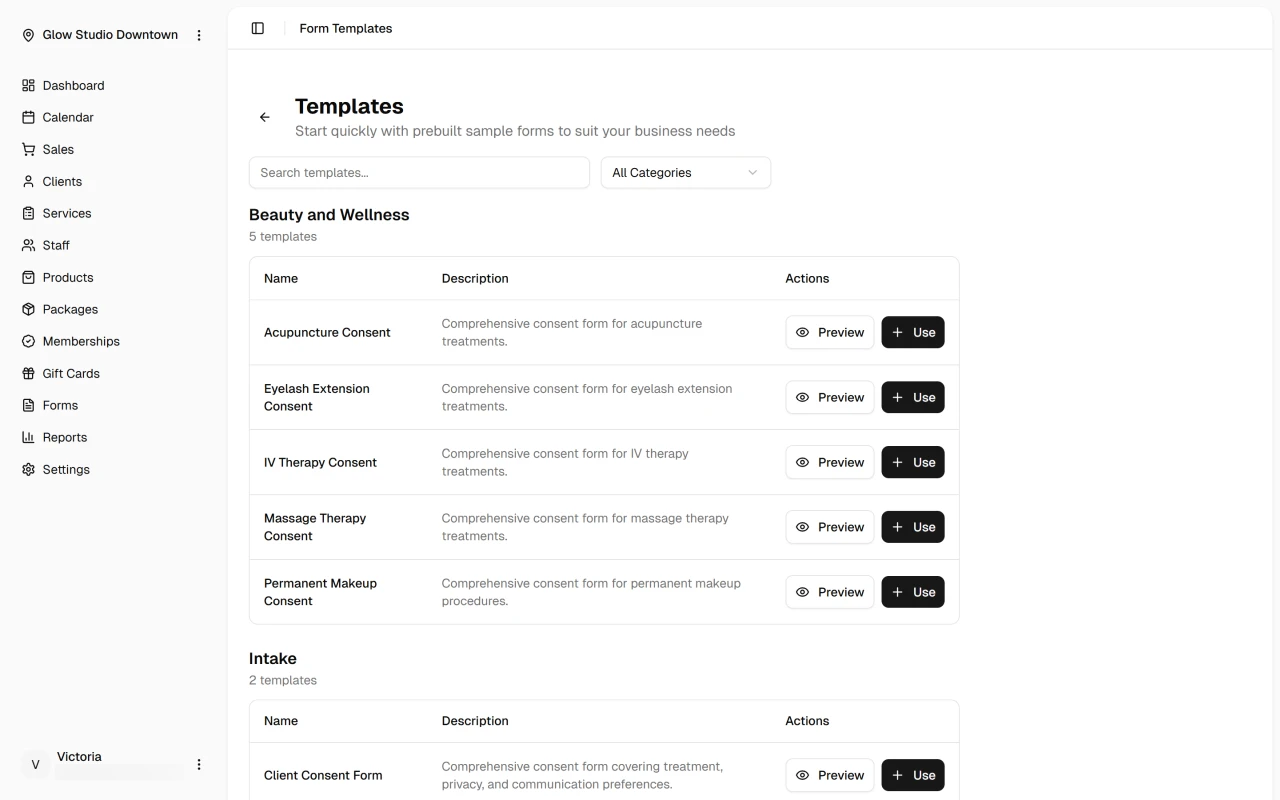
To find and use a template:
- Click "Browse Templates" and choose a category to see available options
- Preview any template before selecting it
- Once you've chosen a template, click the "Use" button to create a new form based on the template
- Customize the form by adding your business details and modifying questions as needed
- Click the "Save" button in the Form Designer to finalize the form details
Best Practices
- Choose a template that matches your service type and customize it based on your business needs
- Levearge industry association or vendor-provided form examples to create new forms where applicable
- If you can't find the right template, you can always create a custom form from scratch using the form designer
What's Next?
Explore more form features:
Here's a Time-Saver!
Why start from scratch when we've done the heavy lifting? Our templates already include all the essential questions and legal language you need. Just pick a template, add your personal touch, and you're ready to go!