
Redeeming Gift Cards at Checkout
When a client wants to pay with a gift card, you can apply it at the point of sale. Gift cards can cover the full amount or be used as partial payment alongside another method.
How to Apply a Gift Card
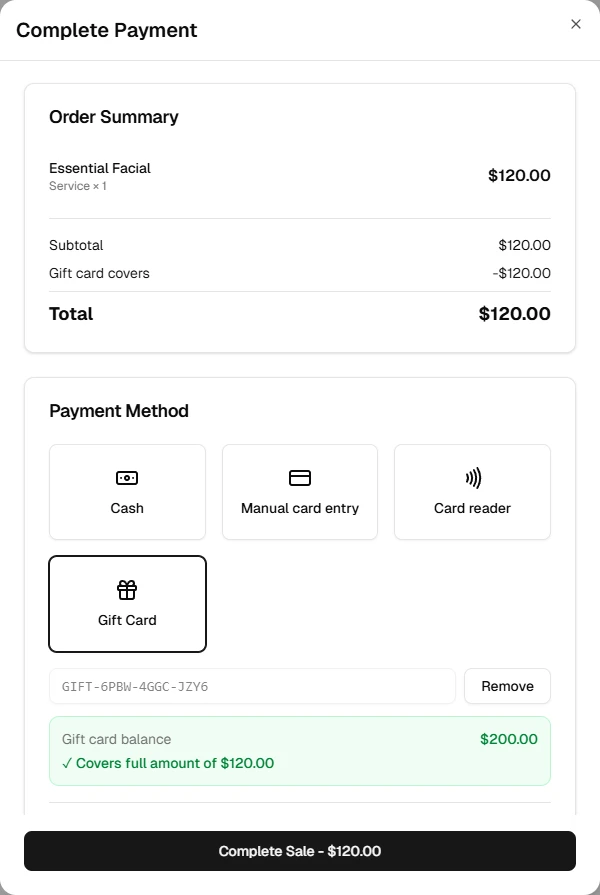
- Add the services and/or products to the cart as usual
- In the Payment section, select Gift Card
- Enter the gift card code in the field provided (e.g.
GIFT-ABCD-1234-EFGH) - Click Apply — the current balance and any remaining amount due are displayed
- Click Complete Sale
Partial Coverage
If the gift card balance is less than the sale total, the remaining amount is shown automatically. You can then collect the difference using:
- Cash
- Card reader
- Card on file
- Manual card entry
The gift card covers as much of the total as possible, and the other payment method covers the rest.
How the Balance Updates
Each time a gift card is redeemed, the balance is reduced by the amount applied. Once the balance reaches zero, the gift card status changes to Redeemed and it can no longer be used.
You can check a gift card's current balance from the Gift Cards management page before applying it at checkout.
Codes are not case-sensitive
Gift card codes can be entered in any combination of upper and lowercase — the system normalizes them automatically.