
Managing Gift Cards
The Gift Cards page (Admin and Manager only) lists every gift card sold at your location — codes, balances, purchase details, and redemption history. Use the search bar to look up a code when a client presents it at checkout.
The Gift Cards Table
| Column | Description |
|---|---|
| Code | Unique redemption code |
| Recipient | Who received the gift card |
| Purchaser | Who bought it |
| Balance | Remaining balance |
| Initial | Original purchase amount |
| Status | Active, Redeemed, Voided, or Refunded |
| Purchased | Purchase date |
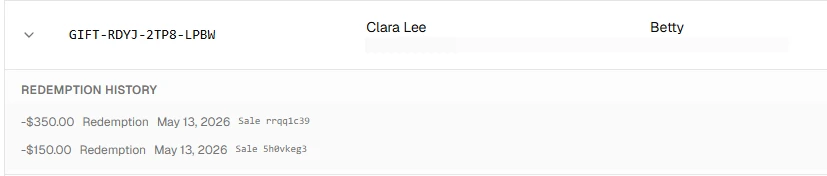
Click any row to expand redemption history — each entry shows the amount, date, and linked sale.
Voiding a Gift Card
To cancel a gift card (e.g. fraud or refund):
- Find the gift card in the table
- Click Void on the row
- Confirm in the dialog
Voiding is permanent
Once voided, a gift card cannot be reactivated. The recipient will no longer be able to use the code.